Which way up: why a print breaks between its layers

A printed part is not equally strong in every direction. Across its layers it holds roughly half of what it holds along them — so which way up it is printed can matter more than the plastic it is printed in.
The short answer
Turn the part so the load runs along its layers, never across them.
That is the whole rule. The rest is how to tell which way the load runs, and what turning the part costs.
Why the layers are the weak part
A filament printer builds a part as a stack of thin slices, and every slice is laid on one that has already started to cool. Along a slice, the plastic is one continuous line pushed out of the nozzle — as strong as that material gets. Between slices there is only a weld: the new line is hot enough to re-melt the surface beneath it for a moment, and the two fuse only as far as that moment allows.
So a printed part behaves less like a block of plastic and more like a stack of pages glued together. Pull along the pages and you are testing the paper. Pull them apart and you are testing the glue.
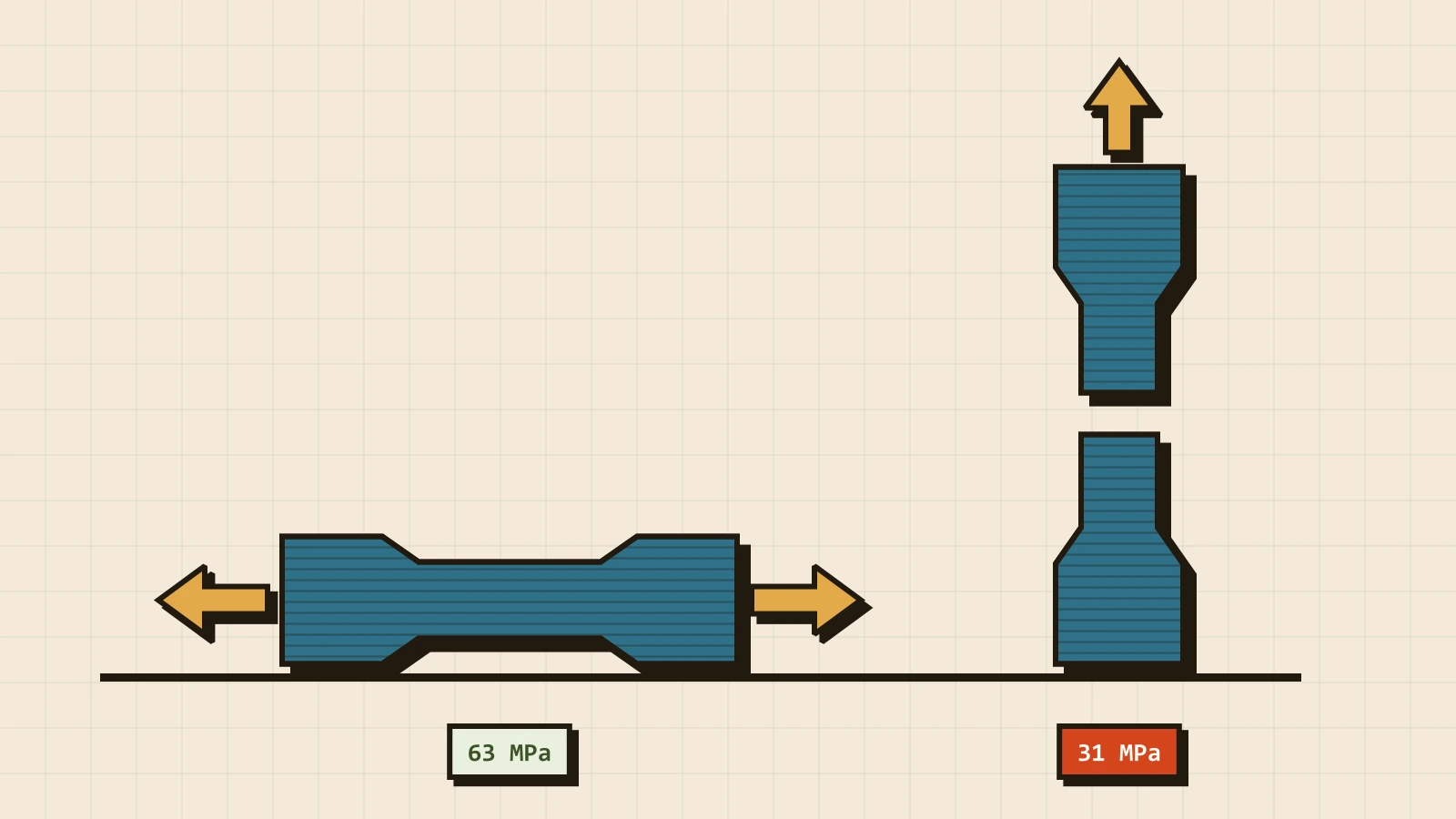
CNC Kitchen measured it on one printer, one spool and one set of settings: PLA test bars printed lying flat broke at an average of 63 MPa, and the same bars printed standing up broke at 31. That half is typical rather than special to PLA — some plastics bond better, and ABS printed under heavy cooling does worse.
This is not a cheap printer's fault. Every filament printer builds parts this way, and every part it makes has a weak direction.
A hook is worse than half
A test bar is pulled evenly along its whole length. A real part almost never is. A hook, a bracket, a clip — they bend, and bending piles the stress onto one place: the surface on the inside of the bend. If a layer line crosses the part right there, the strength of the whole part is the strength of that one line.
That is why the gap on a real shape is wider than on a bar. In another CNC Kitchen test, ABS hooks printed lying flat carried 35 kg before they failed. The same hooks printed standing up carried 6. Same file, same plastic, same printer — only turned through 90° on the plate.
Reading a part for its load
Before choosing a way up, find where the part will bend or be pulled, and picture its layers as horizontal pages stacked from the plate upwards. The part fails by those pages coming apart, so the job is to keep the load from prying them open.
| Part | What loads it | Print it |
|---|---|---|
| Wall hook, shelf bracket | bending at the corner | on its side, profile flat on the plate |
| Snap-fit clip | the arm flexing every time it closes | with the flexing arm lying flat |
| Pin, peg, standoff | a knock from the side | lying down, if anything can knock it |
| Box, enclosure, cover | very little | whichever way needs the least support |
| Part with a round hole | the fit, not strength | with the hole's axis upright |
The last row is not about strength, and that is the point: some parts are decided by something else. A hole printed with its axis upright comes out round. Printed lying down, its top has to be bridged, and it comes out slightly flattened there.
What turning it costs
Turning a part costs nothing at the printer. What it trades is everything else the orientation decides, and sometimes one of those wins over strength.
- Support. The strongest way up can leave an overhang hanging in the air. Support costs filament and minutes, and it leaves a mark wherever it touched.
- Surface. The face on the plate comes out flat and takes the plate's texture, sloped faces show steps, and vertical walls show the layer lines. Laying a part on its side can run those lines straight across the face you wanted smooth.
- Footprint. A hook lying flat sits on its whole profile. Standing, it sits on the end of its stem — and a tall part on a small footprint is the one that comes off the plate.
The compromise people reach for is printing at an angle. CNC Kitchen tried that too: bars at 45° held 40 MPa, roughly a quarter more than standing and still well short of lying flat. In practice an angled part sits on almost nothing, every angled print in that test that needed support failed, and the angled hook held no more than the standing one. Angling is a tool for a part that cannot lie flat, not a default.
Settings help, less than turning it
Within a sensible window, the slicer moves layer strength far less than the orientation does.
- Layer height. In CNC Kitchen's layer-height test, PLA hooks printed standing were all fine from 0.05 to 0.2 mm, with 0.15 mm the strongest. At 0.3 mm they held about half, at 0.4 mm almost nothing. A layer thicker than half the nozzle is where the bond falls apart; the everyday 0.2 mm on a 0.4 mm nozzle is inside the safe band.
- Temperature. Hotter bonds better, up to a point. Standing PLA bars went from 37 MPa at 200 °C to 40 MPa at 230 °C, then fell back to 32 MPa at 270 °C (the test). Too hot hurts the bond as much as too cold, and strings besides.
- A dry spool. Water in the filament turns to steam in the nozzle and leaves voids exactly where the layers were meant to fuse.
- Walls before infill. Extra perimeters thicken the skin, which is what carries a bending load. Extra infill adds weight to the middle, where a bending part does the least work.
None of it closes the gap. The 63-against-31 bars were printed at sensible settings, and the standing ones still held half.
Tip from the workshop. Tell us in the notes how the part is loaded — "a 5 kg bag hangs from the tip" is plenty. Without that we orient for the least support and the best-looking faces, which for a hook is exactly the wrong way up.
When turning it is not enough
Some parts are loaded every way at once: a peg that can be knocked from any side, a part that twists, a clip that flexes in two planes. No orientation keeps every load along the layers. Then the fix is in the design and the material:
- Round the inside corner. A fillet where the stem meets the arm spreads the stress over several layer lines instead of piling it onto one.
- Thicken it where it bends. Bending stress falls with the square of the thickness, so a little more material at the bend goes a long way.
- Split it. Two pieces, each printed its own best way up, joined with a screw.
- Choose a tougher plastic. PETG bends before it breaks, which turns a sudden split along a layer into a warning you can see.
Common questions
Does 100 % infill fix it? It makes the part heavier and stronger overall, but the weak direction stays. Infill fills each layer from the inside; the weld between layers is the same weld. Even a fully solid part is a stack of welded slices, so the ratio between the two directions stays roughly where it was.
What if you print it hotter? It helps, a little. In the test above, going from 200 °C to 230 °C bought less than a tenth more. Turning the part doubled it.
Will you choose the orientation for me? Yes, for every part we slice. What decides it is what we know about the part — which is why the tip above matters. If you send a 3MF with the part already placed and that placement is deliberate, say so in the notes.
Why did my hook break along a perfectly straight line? Because that line is a layer. A clean, flat break that follows one layer exactly is a layer weld letting go — the mark of a part printed with the load running across its layers. A break through the layers is rough and jagged.
Does any of this matter for a part that carries nothing? Hardly. A figurine, a case or a stand does not care which way its layers run, and for those the orientation is decided by support and looks. This is about parts that work.