Upload to price: what we measure in your file

A price comes back a few seconds after you upload. Here is what gets measured in between — and the two things in a mesh that turn that number from a measurement into an estimate.
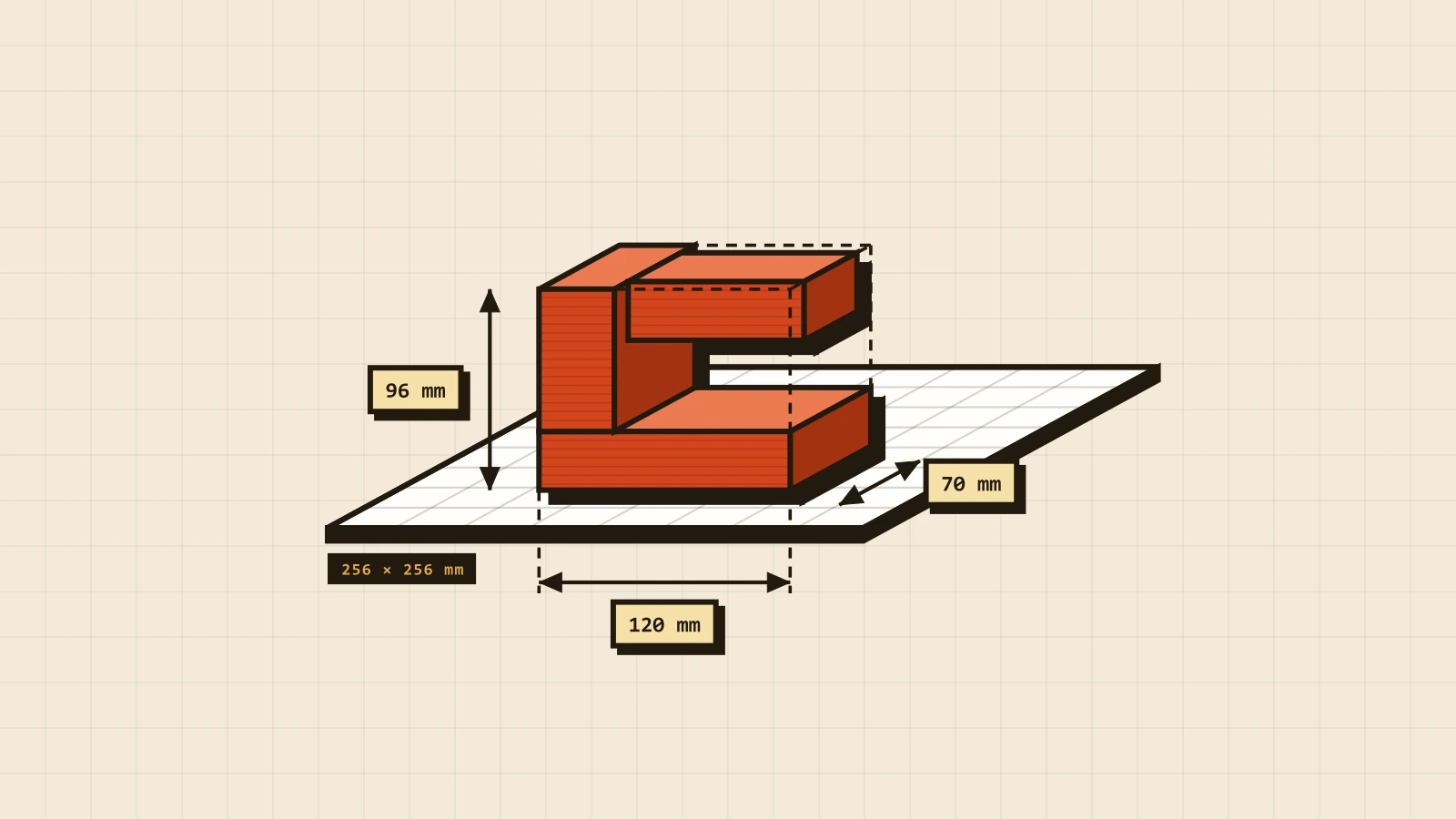
Four numbers, in that order
Bounding box, closed surface, enclosed volume, downward-facing faces. Everything else in the quote is arithmetic on those four.
Does it fit the plate
Our machines print inside 256 × 256 × 260 mm. Your part's three dimensions are sorted against the plate's three, so orientation does not matter: if it fits in any rotation, it fits. Past that, the part has to be split — a join we design in, rather than a cut you discover later.
The one thing no mesh can tell us is its unit. STL does not record one at all; 3MF does, but we read both as millimetres. So if your CAD works in inches, a 40 mm bracket arrives as a metre of plastic. Export in millimetres and the question disappears.
Tip from the workshop. Before you look at the price, look at the dimensions we read back. If the part is not roughly the size you drew, it was exported in the wrong unit, and nothing after that number means anything.
Closed, or approximately closed
A printable surface is closed: every edge belongs to exactly two triangles. An edge with one triangle is a hole. An edge with three is a surface folded back on itself. We count every edge in the file, and if a single one fails, the part has no measurable inside — so the volume gets estimated from the surface area and a single wall thickness instead, and it shows up with a ~ in front of it.
The
~is not a rounding sign. It means the volume was inferred from the outside of a surface that never closed.
There are two ways to land there. One is a real hole in the mesh. The other is sheer size: above 300 000 triangles the edge count is skipped and the estimate is used regardless. Exports from CAD are almost always closed; sculpted, scanned and heavily decimated meshes often are not. Blender's 3D Print Toolbox, Windows 3D Builder and Meshmixer will each repair and decimate in a couple of clicks.
What the volume buys
Price starts from weight, and weight comes from the enclosed volume rather than the bounding box — a hollow part and a solid one of the same size are not the same part. Unless the file says otherwise we assume 15 % infill, which is what most functional parts want anyway.
Time is the other half, and it follows the surface as much as the volume: about 0.37 minutes per cm² of surface and 0.5 per cm³ of volume, plus a fixed ten for bed heat and calibration. That is not a textbook figure — it is fitted to real slicer output at 0.2 mm layers, where a 177 cm³ model came back at 2 h 48 min. Perimeters print slowly and infill fast, which is why a lattice can take longer than the block it was cut out of.
Which way is down
Every downward-facing face tilted more than 30° off vertical gets flagged. That is stricter than the usual 45° rule on purpose: it is a flag for a human to look at, not a verdict. Flagged parts need support, and support costs time to print, time to pick off, and leaves a texture on whichever surface it touched.
Rotating a part is free. A 45° chamfer instead of a flat ledge is nearly free. Support is the expensive option.
| What gets read | Where it comes from | What it changes |
|---|---|---|
| Dimensions | the bounding box | fits the plate, or gets split |
| Closed or not | every edge, counted | a measured volume, or a ~ |
| Volume | the surface, integrated | weight, and the price from it |
| Overhangs | the angle of every face | support, and the hours it adds |
| Layer height, infill, real weight | only a 3MF sliced in Bambu Studio | the most exact quote we can give |
The one thing an STL cannot tell us
A mesh is a bag of triangles with coordinates on them. It records where the corners are — and nothing at all about what those coordinates mean.
An STL has no units. The file says a vertex sits at 25.4; it does not say whether that is 25.4 millimetres or 25.4 inches, because the format has nowhere to write it down. Every reader on earth resolves that the same way: it assumes millimetres and hopes.
Which is why the classic upload problem is not a broken mesh but a right mesh at the wrong scale. A part exported from a CAD package set to inches arrives 25.4 times too large. One exported in centimetres arrives ten times too small. Neither is corrupt, neither triggers a warning, and both quote perfectly — as a part the size of a wardrobe, or one that would fit on a fingernail.
So the first thing worth checking when a quote surprises you is the dimensions we read back, not the price. If the bounding box is not roughly the size you drew, nothing after it is meaningful. 3MF does record a unit, but we read every file as millimetres, so export in millimetres whatever the format. What makes 3MF the format to send is everything else it carries: colours and, often, the slicer’s own settings.
The sizes that actually print
The other half of "will this work" is not about the file at all. A 0.4 mm nozzle lays down a road about 0.4 mm wide, and everything below follows from that one number:
| Feature | Practical minimum | Why |
|---|---|---|
| Wall | 0.8 mm | two passes of the nozzle; one is fragile and prints badly |
| Embossed or engraved detail | 0.6 mm wide, 0.4 mm deep | narrower than this and the nozzle cannot draw it |
| Pin or free-standing post | 2 mm | thinner wobbles as it is printed and snaps in the post |
| Hole | 2 mm, and drawn oversize | holes come out slightly under; plastic shrinks inwards |
| Clearance between moving parts | 0.2–0.3 mm | less and the parts fuse into one |
None of these are hard limits — they are where the failure rate starts climbing. Under them a part is not impossible, it is a gamble, and a gamble that usually gets discovered after the print rather than before it.
Two of them catch people repeatedly. Holes print undersize, so a hole meant for an M3 bolt should be drawn a couple of tenths over, not exactly at 3 mm. And clearance is not optional: two surfaces drawn touching in CAD will be one surface after printing, because the plastic on each side spreads a little as it is laid down.
Which format to send
3MF is the best of them, and a 3MF you sliced yourself in Bambu Studio is better still: it carries the real weight, infill and layer height, so the estimate becomes a reading. STL is fine, and it is what most people have — geometry and nothing else. OBJ is read the same way. STEP we accept but do not measure: it is CAD, not a mesh, so it skips the automatic pass and a person quotes it by hand.
When the number looks wrong
Sometimes it is. A ~ you did not expect, a support flag on a part with nothing overhanging, a weight that does not match what your slicer showed — say so in the notes with the order and we re-quote by hand. Ten seconds is what the automatic pass is for. It does not get the last word.
Common questions
Why is my part quoted at the wrong size? Almost always units. An STL has none, so a model exported in inches arrives 25.4 times too big and one exported in centimetres ten times too small. Check the dimensions in the quote against the ones you drew before you look at the price — and export in millimetres, whatever the format.
Do I need to repair the mesh first? Usually not. Small holes and flipped normals are common, and both the automatic pass and the slicer cope with them. What is worth fixing is a model that is genuinely two overlapping shells or has self-intersecting geometry, because that is where the volume — and therefore the price — stops being a measurement and becomes a guess.
Does hollowing the model make it cheaper? Rarely, and often the reverse. We print with infill already, so the inside of a "solid" model is mostly air before you touch it. Hollowing it yourself adds internal walls the slicer would not have made, and the roof of a sealed hollow has to be printed over nothing, so it sags. Ask for lower infill instead — that is the same saving without the geometry.
Can you quote a STEP file? Yes, by hand. STEP is true CAD rather than a mesh, so it holds real curves and real units and skips the automatic pass entirely. It is the better file to send if a dimension matters; it is just not the faster one to price.
What if I do not have a model at all? Then there is nothing to measure, and the ten-second pass does not apply — but the request still works. The same form takes photographs, reference images and a description instead of a file, and a napkin sketch with dimensions on it is a genuinely useful starting point. What comes back is a quote written by a person rather than a number from a mesh, so say what the part has to do and what it has to fit.