Two colours, one nozzle: what an AMS throws away

A second colour does not cost a second spool — it costs everything the nozzle has to push out to stop being the first one. How much that is depends on the height of your part, not its size.
Four spools, one nozzle
The AMS holds four spools and feeds a single hot end. Nothing blends in there, and nothing can: to change colour the machine cuts the filament, pulls it back out, pushes the next one in, and then extrudes until the last of the old colour is gone.
That extruded plastic is not part of your model. It goes into a purge tower printed beside the part, or out of the chute at the back of the machine as a row of wiped lumps. Either way it was bought by the kilo and it ends up in a bin.
A colour change is not a switch being flipped. It is a nozzle being emptied, and emptying it costs plastic.
Why there is a floor under the number
The hot end is not a point. Below the cutter there is a channel, a melt zone and a nozzle, and together they hold roughly 110 mm³ of molten plastic. That volume is already the old colour, and there is no way to take it back out — the only exit is the nozzle.
So every change starts by pushing at least that much through before the new colour can even begin to arrive pure, and then keeps going while the tail end of the old one streaks out of the corners of the melt zone. The floor is physical. It does not care whether your part is a keyring or a crate, and it is the reason a colour change on a tiny part feels so disproportionately expensive: the nozzle costs the same to empty either way.
The cost is per change, not per colour
The slicer keeps a table of how much to flush for every pair of colours loaded. Two shades of grey need very little. Black after white needs more. White after black needs the most of all — a pale colour goes on showing the last of a dark one long after you would expect it to stop.
On the defaults those numbers run from around a hundred cubic millimetres to several hundred. Call it a third of a gram per change and you can plan with it; the exact figure sits in the slicer before you print, and it can be edited.
Everything after that is multiplication.
Flushed plastic = how many changes × the flush for that pair. The question is never "how many colours". It is "how many times".
Height, not size
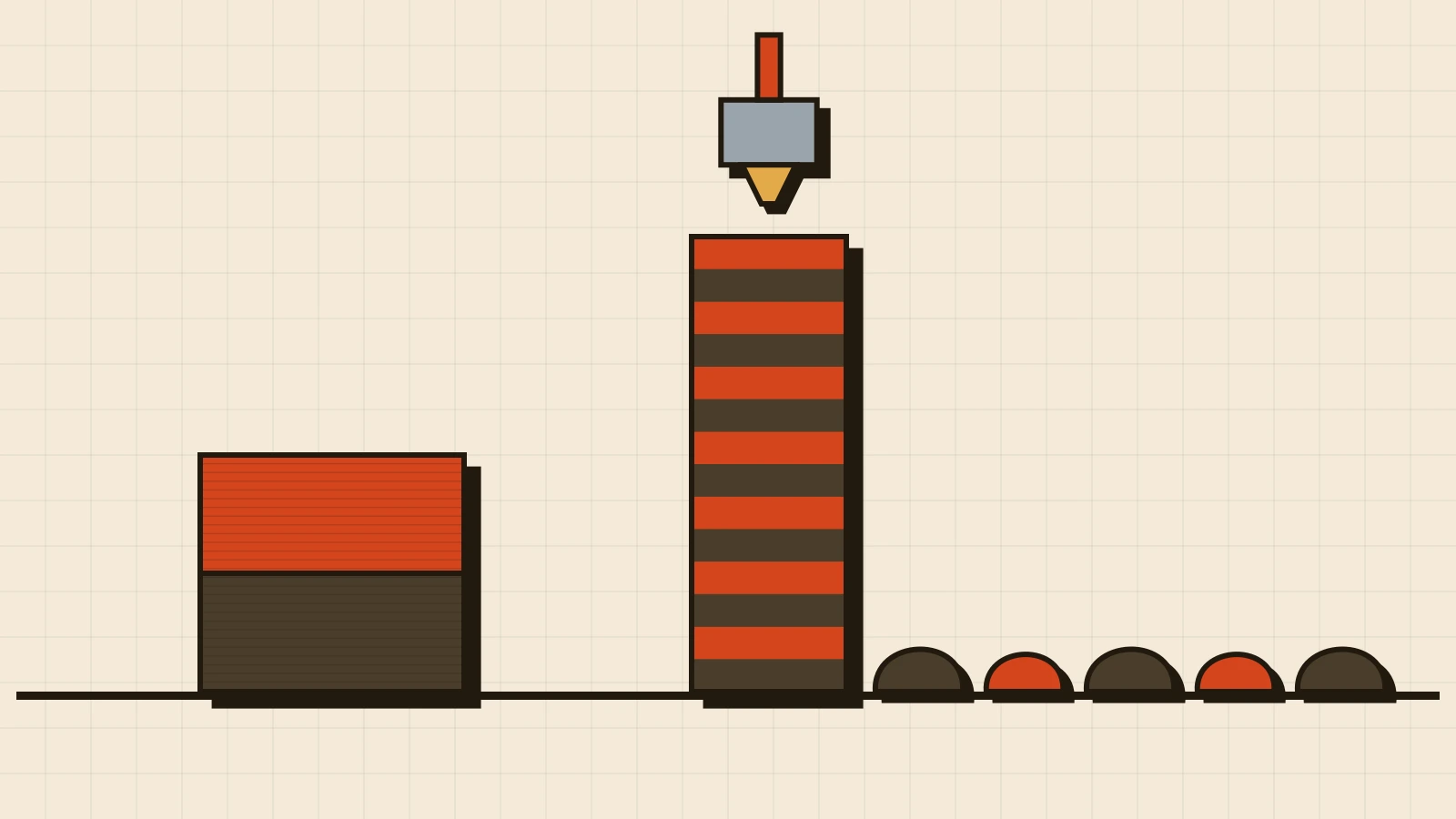
A change happens every time the nozzle is asked for a colour it is not holding. Where both colours appear on every layer, that is two changes per layer, all the way up. Lettering on the top face costs changes on the ten layers that carry it and nothing below.
Same part, same two colours, same plate, at 0.2 mm layers:
| Where the second colour is | Layers with both | Changes | Flushed |
|---|---|---|---|
| Lettering on the top face, 2 mm deep | 10 | 20 | ~7 g |
| A stripe up the full 40 mm of the part | 200 | 400 | ~140 g |
The part in the second row might weigh 60 g. Getting it means buying 200 g of filament and throwing 140 g of it away. That is why two colours are not twice one colour: the flush has nothing to do with how much of the second colour ends up in the part.
The defaults are deliberately generous
The numbers the slicer ships with are set so that the worst pairing on the worst day still comes out clean. Most pairings are not the worst one, and printers who calibrate their own flush volumes — printing a test that steps the flush down until the old colour shows through — routinely land well under the default for the pair they actually use.
Two things make the biggest difference, and both are free:
- Direction. Going from light to dark is cheap; dark to light is expensive. A design that happens to change in the cheap direction more often than the expensive one costs less to print, with no visible difference at all.
- The multiplier. Every flushing figure in the table can be scaled at once. Dropping it to 0.8 or 0.9 is a common, conservative starting point, and the failure mode is visible immediately on the first part rather than hidden.
Neither is something you need to do for an order you send us. They are the reason our number for a two-colour part is lower than a default slice would suggest.
Five ways to bring it down
- Put the colour in a horizontal band, not a vertical stripe. Colours split by height change once per band. Colours that interleave change on every layer. Same drawing, arranged differently — that is the whole gap between the two rows above.
- Keep it to two. Three colours on a layer is three changes on that layer.
- Flush into the part. The slicer can spend the purge inside the model's own infill, or into another object on the plate, instead of into a tower. It does not remove the flush; it puts it somewhere that was going to be plastic anyway.
- Fill the plate. Eight of the same keyring take the same number of changes as one. The flush divides by eight. The parts do not.
- Or do not change colour at all. Two parts glued, paint rubbed into engraved lettering, a printed badge pressed into a recess — all cheaper than a tower, and the last two look better close up.
What it does to a quote
We price from weight, so the flush is not a surcharge hidden somewhere. It is filament, and it lands in the number exactly the way the part does.
A 3MF you sliced yourself already carries that number: the total the machine will pull off the spools, purge included. That is why a sliced two-colour file quotes higher than the same geometry in one colour. An STL cannot carry it at all — it is a mesh, with no colours in it — so write the colours and where they go into the notes, and we will slice it and come back with a real figure rather than a guess.
Tip from the workshop. Sending an STL for a two-colour part? Write in the notes which colour goes where. A mesh carries no colours, and that one sentence is what turns our number from a guess into a slice.
When two colours earn it
Often they do. Lettering readable across a room, a keyring someone keeps, a part that has to match a brand. That is different from a part that has two colours only because the model arrived that way — and if that is the one you have, say so. Nine times out of ten there is a version of it that prints in one.
Common questions
How much filament does an AMS actually waste? Per change, somewhere between a fraction of a gram and about a gram, depending on which colour is replacing which. Per print, that number times the number of changes — which is why the same two colours can cost seven grams on one design and a hundred and forty on another.
Can I just turn purging off? No, and the reason is the 110 mm³ sitting in the hot end. Skip the flush and the first centimetres of the new colour come out as the old one, in your part, where you will see it. What you can do is reduce the flush and redirect it.
Does the purge tower have to be printed? No — the waste can go into the model's own infill, into a sacrificial object on the plate, or out of the chute. The tower is the default because it is the most reliable, not the cheapest.
Can the waste be reused? Not back into a print. The lumps are a blend of two or more colours and have already been through the nozzle once, so putting them back means regrinding and re-extruding — equipment a print shop does not have and a filament maker does. The honest answer is that the way to save it is to not make it, which is what the list above is for.
Do four colours cost twice as much as two? No — it costs however many changes the design forces. Four colours split into four clean horizontal bands is three changes in the whole print. Two colours alternating on every layer of a tall part is hundreds. Count the crossings, not the spools.